AI‑Driven DevOps Architecture

The futurists are saying that AI is going to write all the code and do everything automagically. But that’s just pie in the sky.

At the same time, right now we are using AI coding tools directly in front of us to eliminate endless Google searches—figuring out how a certain API needs to be used, what the syntax is, how to use Library A for that, or whatever it happens to be.

I don’t have a great memory for all the PowerShell commands, so AI really helps me determine the right usage on the command line.

I want to talk about the notion of an AI Software Factory. You’ll probably see a Forbes headline someday with that phrase, but I want to view it through a software engineering lens. The pattern I think is most appropriate—the one I want to talk about—is the AI‑driven DevOps architecture.

Back in 2008 and 2009, I had a major epiphany and published thoughts on Onion Architecture and managing dependencies in .NET applications. The Onion Architecture : part 1 | Programming with Palermo. In 2019, I wrote my fourth book, .NET DevOps for Azure, which put forth an architecture for DevOps environments in .NET applications.

Building on that foundation, I'd like to explore what it means to have an AI‑Driven DevOps Architecture.


What Must an AI‑Driven DevOps Environment Include?

If all I do is use Copilot inside Visual Studio, or tools like Claude CLI, Cursor, OpenCode, or Junie inside JetBrains Rider—essentially the engineer‑attended coding tools—then my DevOps environment doesn’t need major changes.

Why? Because I’m still reviewing every line of code. The tools move only as fast as my brain. This brings huge benefits—fewer Google searches and less documentation‑digging—but nothing architecturally must change in the DevOps environment.

But that won’t get us 10x or 100x faster software delivery. That’s just incremental improvement. That’s just making individual engineers faster.


A Concrete Example

Imagine I need to extend a data field from 10 characters to 12.

This is simple. We know exactly how to do it:

  • Database migration
  • Automated tests
  • Validation
  • UI adjustments

Easy. So what needs to exist in the DevOps environment in order to delegate this entire change to a computer?

This is where the AI‑Driven DevOps Architecture begins.


The Automation Requirements

Let’s assume we define an issue and assign it to a Copilot Coding Agent. In that case, the DevOps environment must support all of the following fully automated:

1. Feature Specification

Detailed enough for any team member—or an AI agent—to pick up.

2. Automated Task Breakdown

Humans usually break down features into tasks. Now it must be automated.

3. Repo and Environment Setup

Cloning the Git repository and setting up the development environment must be 100% automated.

4. Feature Branch Creation

Automatically created.

5. Private Build Verification

Automatically run a private build to ensure a clean environment.

6. Code + Config Changes

All changes generated automatically.

7. Pre‑Commit Build

Run automatically.

8. Push to GitHub

Automated.

9. Integration Build

Run automatically on the feature branch.

10. Release Candidate Packaging

Automatically produced.

11. Test Environment Deployment

Automated deployment to the first‑line test automation environment (the TDD environment).

12. Full System Acceptance Testing

Run automatically.

13. Pull Request Creation

Created automatically.

14. Pull Request Review

Reviewed automatically.

15. Merge

Merged automatically.

16. Master Branch Build

Automatically triggered.

. . . and so forth.


The Shift to AI‑Driven DevOps Architecture

Every non-creative step humans normally do manually must become automated.

These enhancements transform a traditional DevOps environment into an AI‑driven DevOps architecture—one that enables completely automated software enhancements, producing:

  • A completed build
  • A deployed version in a manual test environment
  • Something product management can evaluate
  • A candidate ready for release to customers

This is the next frontier in DevOps.

Originally published on LinkedIn.
The Mindset Shift Required for AI‑Driven Development

For decades, software engineering has operated under a deeply ingrained mental model: developers design the system, write the code, understand its internals, and remain responsible for operating and maintaining it. Even with all our talk about “raising the level of abstraction,” we have mostly continued hand‑crafting software the way mechanics hand‑build custom cars.

But today we’re standing at the edge of a transformational shift—one that requires us to rethink who maintains software, who changes it, and how those changes safely enter production. AI‑driven development is forcing us to adopt a new mindset, and to get there, we need better analogies to understand what’s changing.

From Mechanic‑Built Cars to Mass‑Produced Vehicles

When I was a kid, I built and repaired my own bicycle. I knew every bolt, every bearing, and every cable. I became a pretty good bike mechanic. I had an uncle who took that same spirit into the world of automobiles. He built his own car from a Cobra kit. He could assemble the frame, drop in a Ford Mustang engine, and wire everything end‑to‑end. It was his machine—designed by him, built by him, operated by him.

For a long time, software has worked exactly like that.

We have been the designers, the builders, and the operators of our own “custom‑built cars.” Even when we deliver software to users, the reality is: we’re the ones who turn it off and on. The users operate workflows, but developers operate the system.

But think about the difference between a mechanic‑built kit car and a Toyota. Toyota builds cars so that anyone can operate and maintain them—without being a mechanic. Owners can perform basic servicing and routine maintenance without knowing how an engine works.

This is exactly the shift software must make.

Software Must Become Maintainable by Non‑Programmers

In the world of AI‑driven development, our users will need the ability to service the software, not just use it. Maintenance won’t just mean restarting a service or changing a setting—it will include modifying configuration and, yes, even making source‑level changes.

That sentence still makes many engineers uncomfortable.

But once we accept that:

not all changes must be performed by a fully‑skilled software engineer,

then the DevOps environment itself must evolve. AI coding tools become the intermediary—allowing analysts, product owners, support personnel, and other trained team members to perform controlled, validated, safe changes.

Imagine a business analyst safely adding a value to a dropdown—without pulling a developer off higher‑value engineering work. In an AI‑augmented environment, this is not only realistic; it’s essential.

Why DevOps Must Evolve Beyond Handcrafted Code

For years, we’ve invested heavily in DevOps maturity:

  • Private builds with unit and integration tests
  • Integration builds producing deployment-ready artifacts
  • Full system acceptance tests in deployed environments
  • Pull requests with human review
  • Release automation and continuous delivery pipelines

This foundation remains crucial—but insufficient.

Today, a pull request from a simple dropdown modification still requires a developer to review it. That means:

  • A human becomes the bottleneck
  • Developer attention becomes the scarce resource
  • Productivity gains plateau

If every AI-generated change still requires a developer to review the PR, then the industry will never achieve the 10x productivity improvement that AI makes possible.

We need additional automated checks—new validation techniques—to determine:

Is a feature branch stable? Did this change unintentionally break anything?

If automated systems can answer that confidently, then humans no longer need to review every simple change.

Identifying Which Changes Should Be AI‑Driven

Not all software work is the same. Some work is:

  • New architectural patterns
  • Novel paradigms
  • First‑time implementations
  • Complex engineering decisions

These still require expert developers hand‑crafting code.

But other work—the vast majority of day‑to‑day changes—comes down to repeating well-established patterns. These repetitive, low-risk modifications are the perfect entry point for AI-driven development.

Once a pattern exists, repeating it is not engineering—it's manufacturing.

AI excels at manufacturing.

Where This Transformation Leads

The challenge I’m proposing is simple but profound:

What must we add to our DevOps environments to let non‑programmers safely perform routine maintenance—including changes that touch source code?

Your DevOps pipeline must evolve to:

  • Validate AI-generated code automatically
  • Confirm functional stability with higher test coverage or new test methods
  • Detect unintended side effects reliably
  • Provide automated PR approvals for safe classes of changes
  • Allow analysts and operators to perform controlled maintenance work

The goal is not to remove software engineers—it’s to free them.

If developers are still reviewing every tiny change, we cannot scale. If they are designing, validating, and engineering the core patterns—and AI handles the repetition—then the industry finally moves toward true software engineering maturity.

A Call for a New Mindset

As AI coding tools advance, the opportunity becomes clearer:

  • Software engineers focus on engineering
  • AI handles pattern-based manufacturing of code
  • Non-programmers, empowered by AI, handle routine maintenance
  • DevOps systems ensure everything is safe, stable, and validated

This is the mindset shift required for the next era of software.

Now the question is: What changes will you make to your DevOps environment to unlock this new model?

God bless.

Originally published on LinkedIn.

How to incrementally adopt VSTS for devops automation

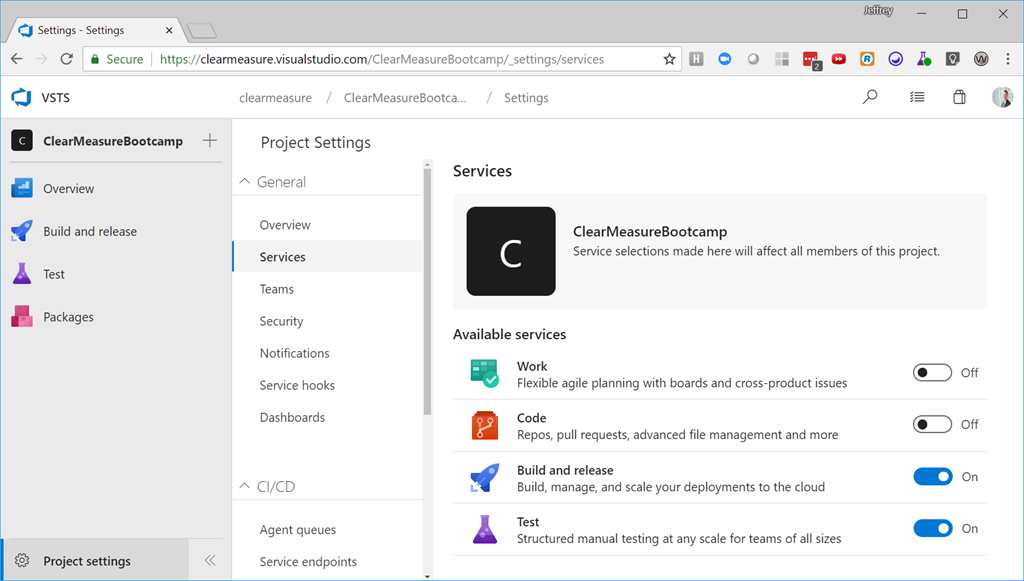
VSTS has fantastic devops-enabling features, but one of the common issues when planning to adopt it is how to plan the large migration of work and project plans from other tools.  The good news is that you don’t have to change anything about where you are tracking your work or projects in order to make use of builds, packaging, or automated deployments.  If you track your work in Jira, your code in GitHub, then you’ll want to configure VSTS like the following:

image

If my VSTS does not look like yours, you’ll want to turn on the new navigation features by selecting your profile picture in the top right corner.

image

With this configuration, you’ll be able to:

  • Configure continuous integration builds
  • Run unit tests & component-level integration tests
  • Package versioned release candidates
  • Architect release candidate packages in the onboard Nuget server
  • Create releases for a particular build
  • Map the progression of pre-production environments as well as production
  • Deploy release candidates
  • Run full-system tests against deployed instances of your builds
  • Trend statistics about your tests
  • Integrate static code analysis into your devops pipeline
  • Configure and run load tests

Many teams have systems to track projects and existing source code repositories in place.  When bringing online devops methods, it may be appropriate to focus the VSTS project on just the capabilities needed at the moment.